You submitted 50 applications last month. You heard back from 3. The brutal truth: most of those rejections didn't come from a recruiter who read your resume. They came from software — an ATS — that scanned your resume in under 6 seconds, ranked it against the job description, and dropped it into a pile no human will ever open. If you don't understand how this software works, you're applying blind. The good news: a free ATS resume scan takes under a minute and shows you exactly where your resume is leaking matches before you click Apply.
What is an ATS?
The short answer
An ATS — short for Applicant Tracking System — is the resume-filtering software that sits between you and the recruiter. When you click Apply on a job posting, your resume almost never goes straight to a human's inbox. It goes into an ATS first. The ATS parses your resume into structured data, compares it against the job description, scores it, and ranks it against every other applicant. Only the top-ranked resumes — typically the top 5-25% — get forwarded to a recruiter.
What ATS actually means
The acronym ATS stands for Applicant Tracking System, and it's been part of corporate hiring since the late 1990s. Today, it's the default infrastructure for any company hiring at scale. Jobscan's 2025 Applicant Tracking System Usage Report found that 98.4% of Fortune 500 companies used a detectable ATS in 2024. If you're applying to a posting on a company career site, LinkedIn, Indeed, or any major job board, your application is very likely going through an ATS first.
That's the part most job seekers miss: you're not really writing your resume for a recruiter anymore. You're writing it for the parser first, and the recruiter second.
How an ATS Works: The 4-Stage Filter
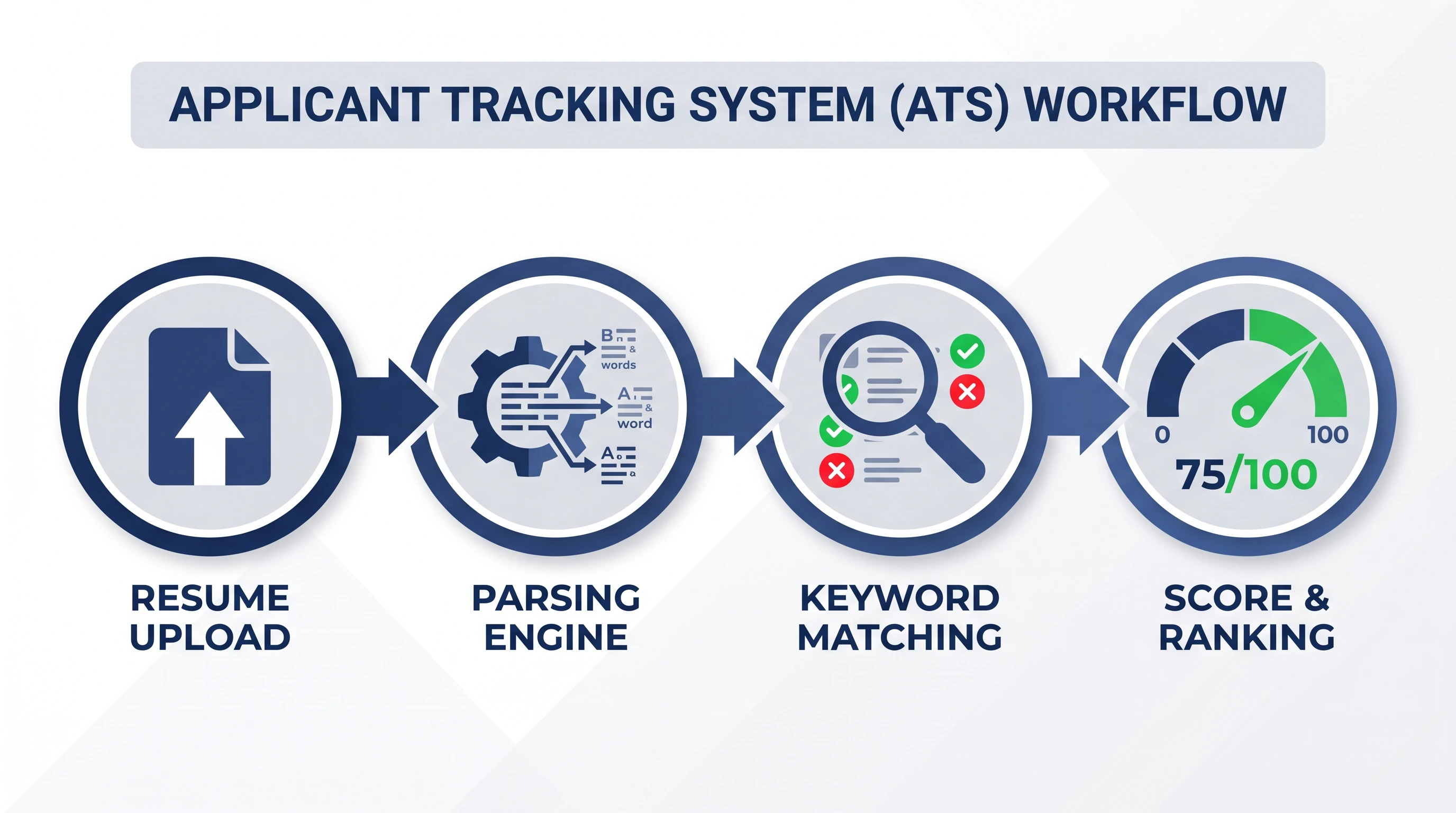
An ATS handles every resume through the same four-stage flow: upload, parse, match against the job description, and score for ranking. Each stage has its own failure mode, and most resumes fail somewhere in Stage 2 or Stage 3.
Stage 1: Upload
You upload your resume (usually .docx or .pdf) through a careers portal or a job-board apply form. The ATS ingests the file — including any embedded metadata, like the file name and document title — and stores it in the company's candidate database alongside the form fields you filled in by hand.
Stage 2: Parsing
The ATS runs your resume through a parser, which extracts structured fields: your name, contact info, work history (company name, job title, dates, bullet points), education, skills, certifications. This is the riskiest stage. If your resume uses a layout the parser doesn't understand — columns, tables, header/footer text, decorative fonts, images — fields will go missing or wind up in the wrong place. A "Senior Software Engineer" job title trapped inside a graphic doesn't exist as far as the ATS is concerned.
Stage 3: Keyword Matching
The ATS compares your parsed resume against the job description's required skills and qualifications. It looks for exact-match keywords ("Python", "AWS", "project management") and contextual matches (years of experience, certifications, education level). The matching is literal — if the job description says "JavaScript" and your resume only says "JS", that's a miss. If the posting says "stakeholder management" and you wrote "managed stakeholders", that's a partial match, not a full hit.
Stage 4: Score and Ranking
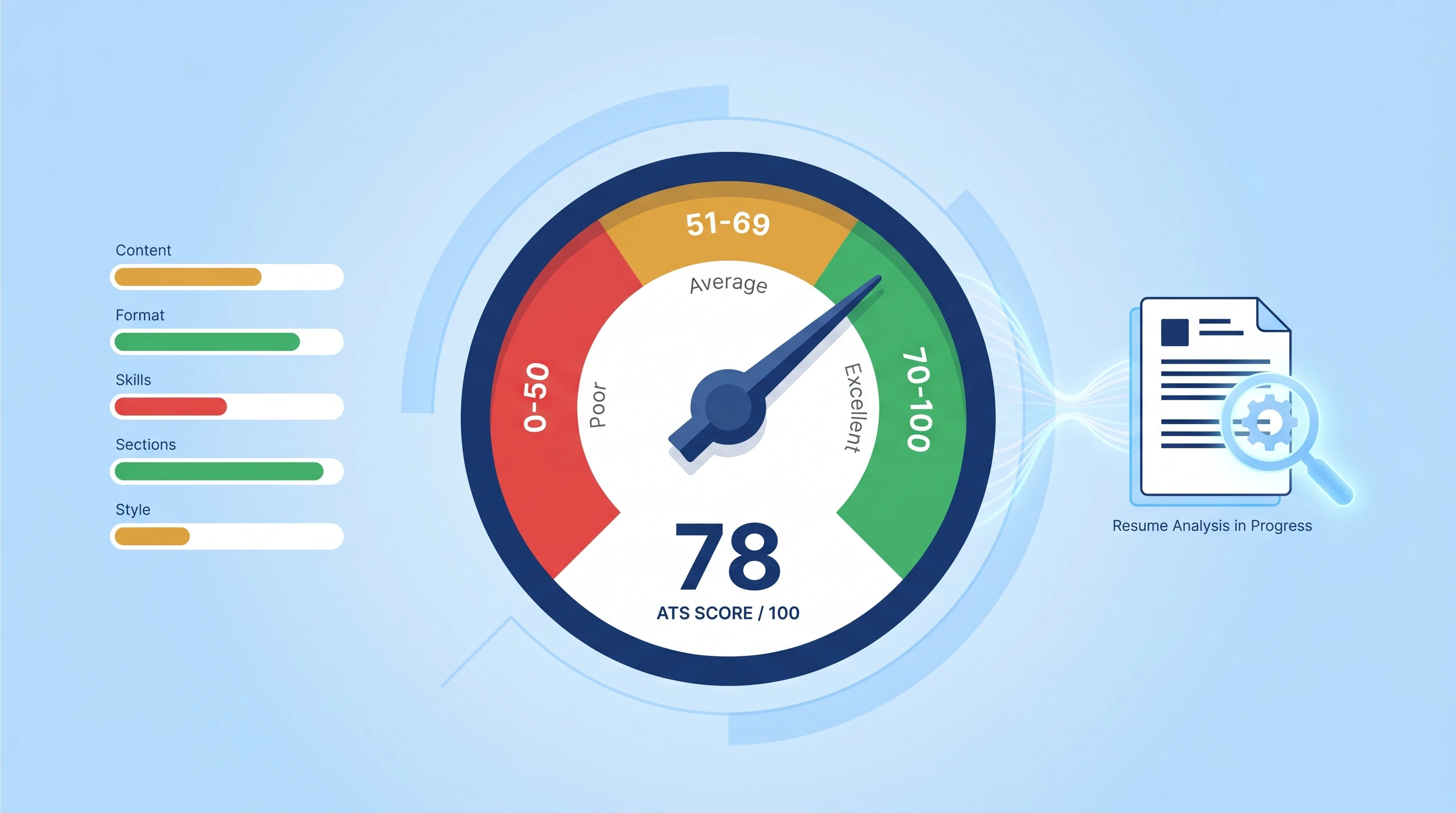
Each resume gets an internal score, usually on a 0-100 scale. Some ATS implementations show this score to recruiters directly; others use it to auto-rank applicants in a list. Recruiters typically only review the top of that list. If a job posting gets 250 applications (the rough average for online postings), maybe 25-50 resumes get human eyes — and the bottom 200 get a templated rejection email no recruiter ever read.
Curious how your resume actually scores?
Run our free 60-second ATS scan to see your match score, missing keywords, and a 20-point diagnostic — before you click Apply.
Try the Free ATS ScanWhy Big Companies Use an ATS
Big companies use an ATS because a single online job posting attracts 200-500 applicants on average — far more than any recruiter can read. The ATS exists to shrink that inbox to the ~25 resumes worth a human's time, by doing four jobs at once:
- Shrink the inbox. From 250 resumes → 25 the recruiter actually reads.
- Standardize the data. Every applicant becomes a row in a database with consistent fields — searchable by skill, years of experience, education level, location.
- Create an audit trail. Compliance teams need to show why certain candidates were screened out (didn't meet required certification, missing visa status, etc.). The ATS logs every screening decision.
- Plug into the rest of hiring. Once a candidate is hired, their ATS profile flows into onboarding, payroll, and HR without re-entering data.
This is also why the average ATS isn't trying to be unfair to you — it's optimizing for recruiter throughput. But the practical consequence is the same: you have to design your resume for the parser first, not just for the human reader at the end of the funnel. If you apply to dozens of roles a week, it's worth checking our pricing for higher-volume scanning before you batch-submit a resume that fails silently.
ATS-Friendly vs ATS-Rejected Resume
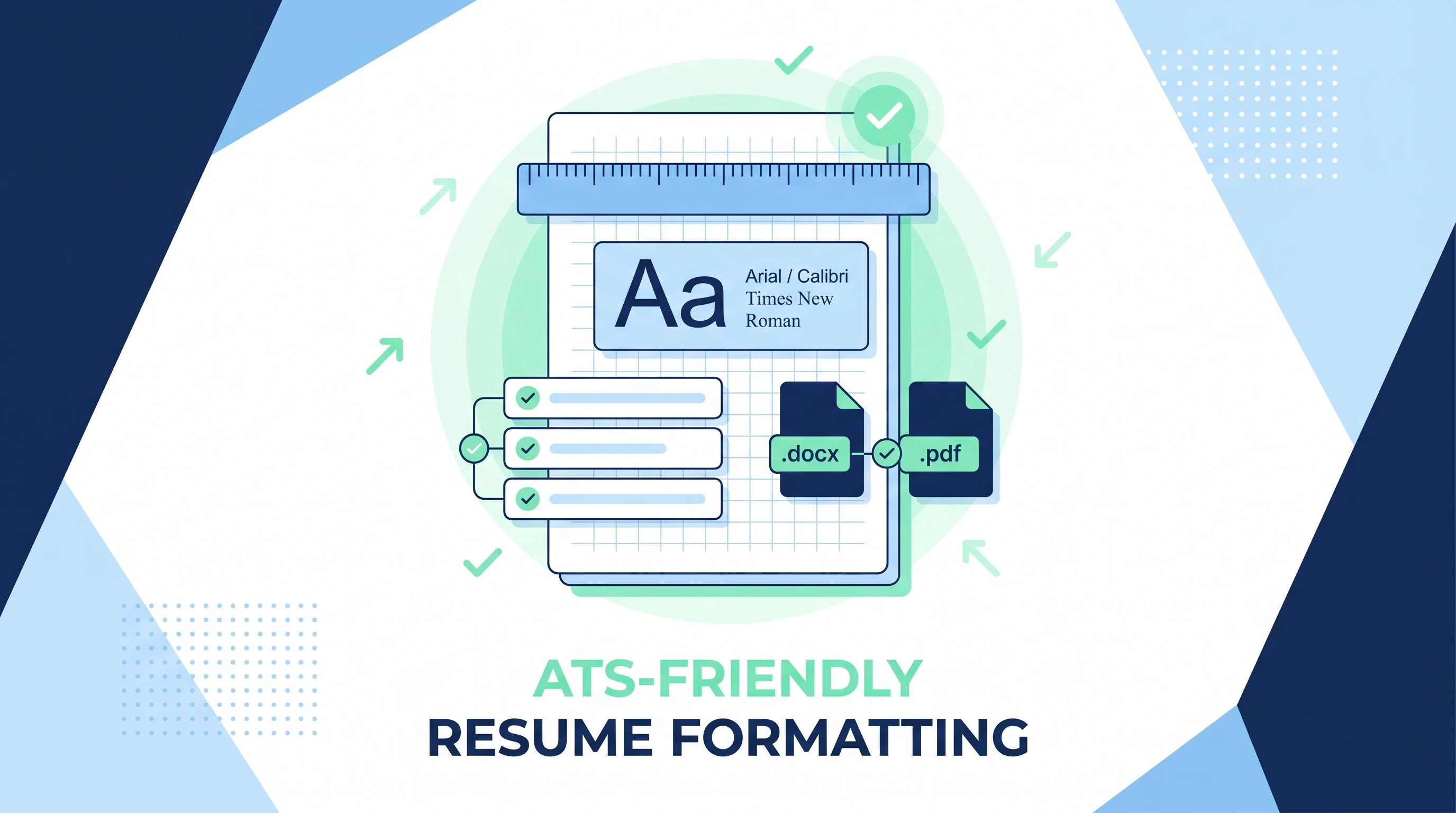
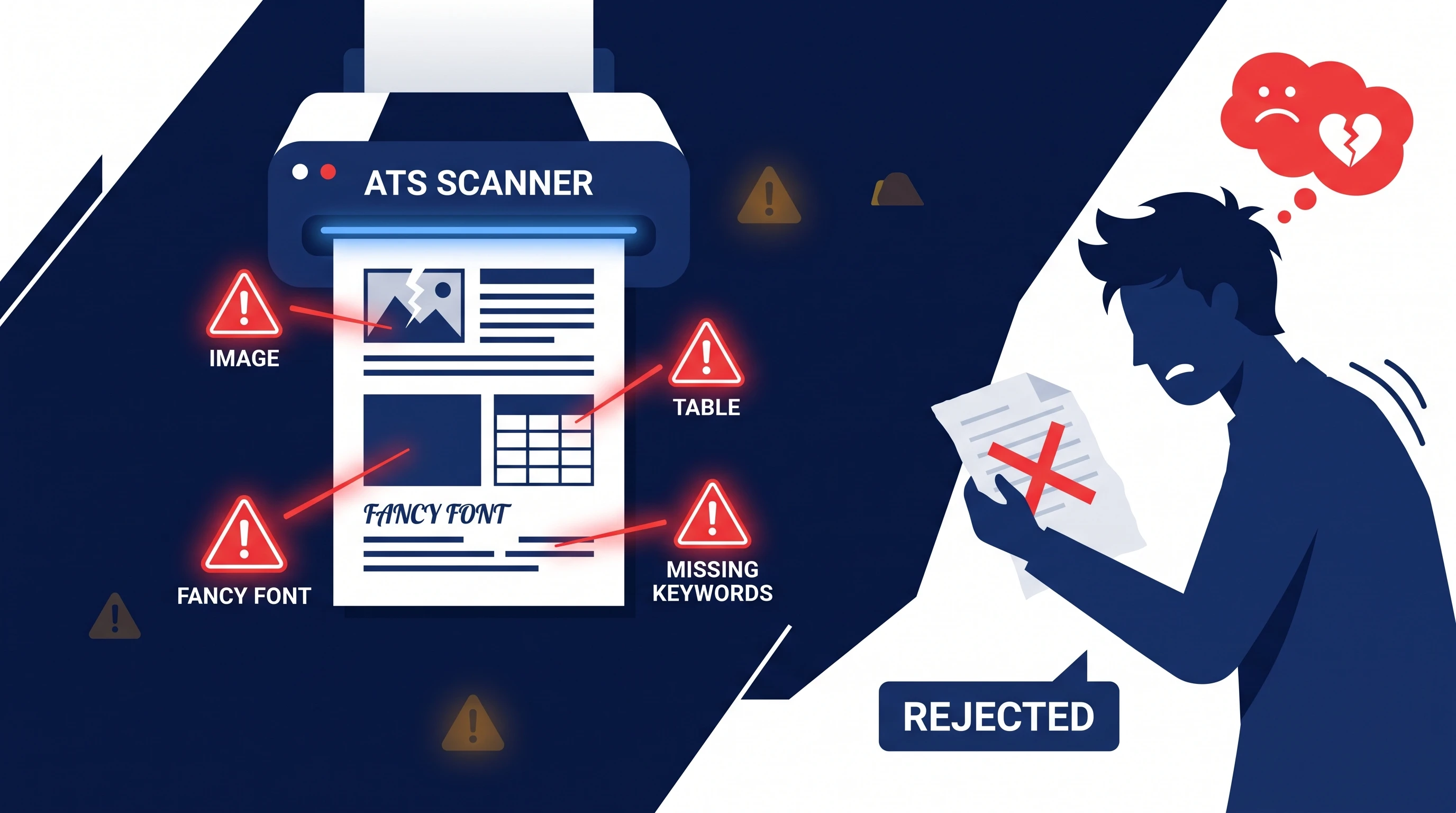
An ATS-friendly resume uses a single column, plain section headers, and a standard sans-serif font. An ATS-rejected resume uses anything fancy — columns, tables, photos, decorative typefaces — that the parser can't read cleanly.
If you've seen a beautifully designed resume with a two-column layout, a sidebar, an avatar photo, and skill bars rated with stars — the kind of resume that looks great in a Canva preview — that's exactly the kind of resume an ATS will rip apart.
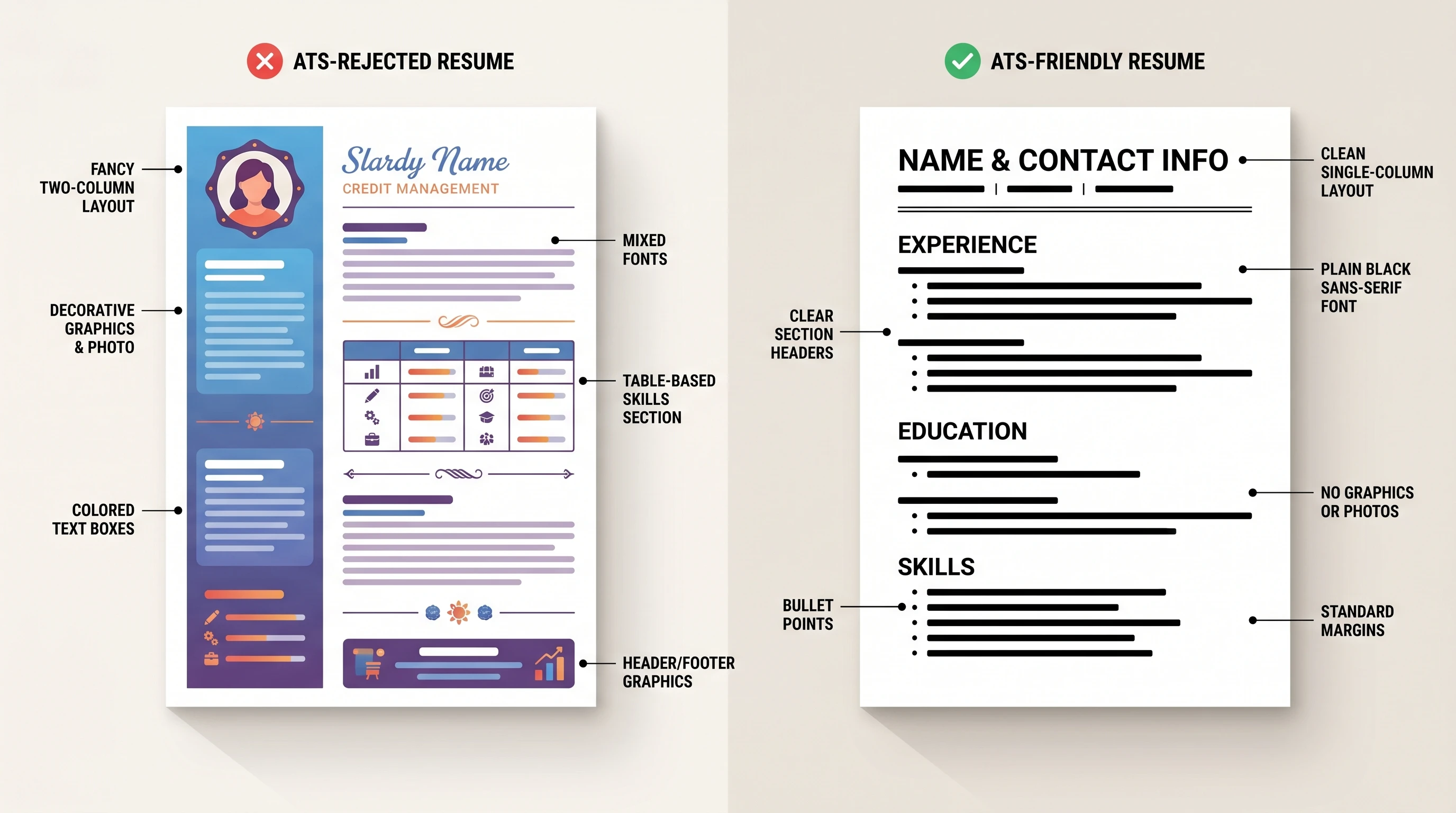
What an ATS hates
- Two-column layouts. The parser reads left-to-right across the page, so columns get interleaved and your job titles end up mashed in with your skills list.
- Tables and text boxes. Same problem — cell content gets read in the wrong order, and the parser often gives up entirely.
- Headers and footers. Many parsers skip them by default. If your name and contact info are in the header, they might just disappear from the candidate database.
- Images, graphics, icons. Text inside an image is invisible to the parser. A skill rated "★★★★☆" tells a recruiter nothing because the stars never make it through.
- Decorative fonts. Comic Sans, script fonts, or any non-standard typeface can cause parsing errors. Stick to Arial, Calibri, Helvetica, Times New Roman, or Georgia.
- Scanned PDFs. If you scanned or screenshotted your resume into a PDF, the ATS sees a single image blob, not text. Zero of your content gets extracted.
What an ATS loves
- A single-column layout with clear, plain-text section headers:
Experience,Education,Skills,Certifications. - A standard sans-serif font at 11-12pt for body text and 14pt for your name.
.docxfirst, text-based.pdfsecond..docxis the format ATS parsers were originally built around, and almost all of them handle it cleanly.- Standard bullet points (•, –, *) instead of fancy unicode symbols.
- Job titles, company names, and dates in a consistent format so the parser can lock onto each role.
- Keywords from the job description, spelled out in the body of your bullets — not stranded in a "Skills" pile at the bottom that the parser may or may not weigh equally.
What Counts as a Good ATS Score?
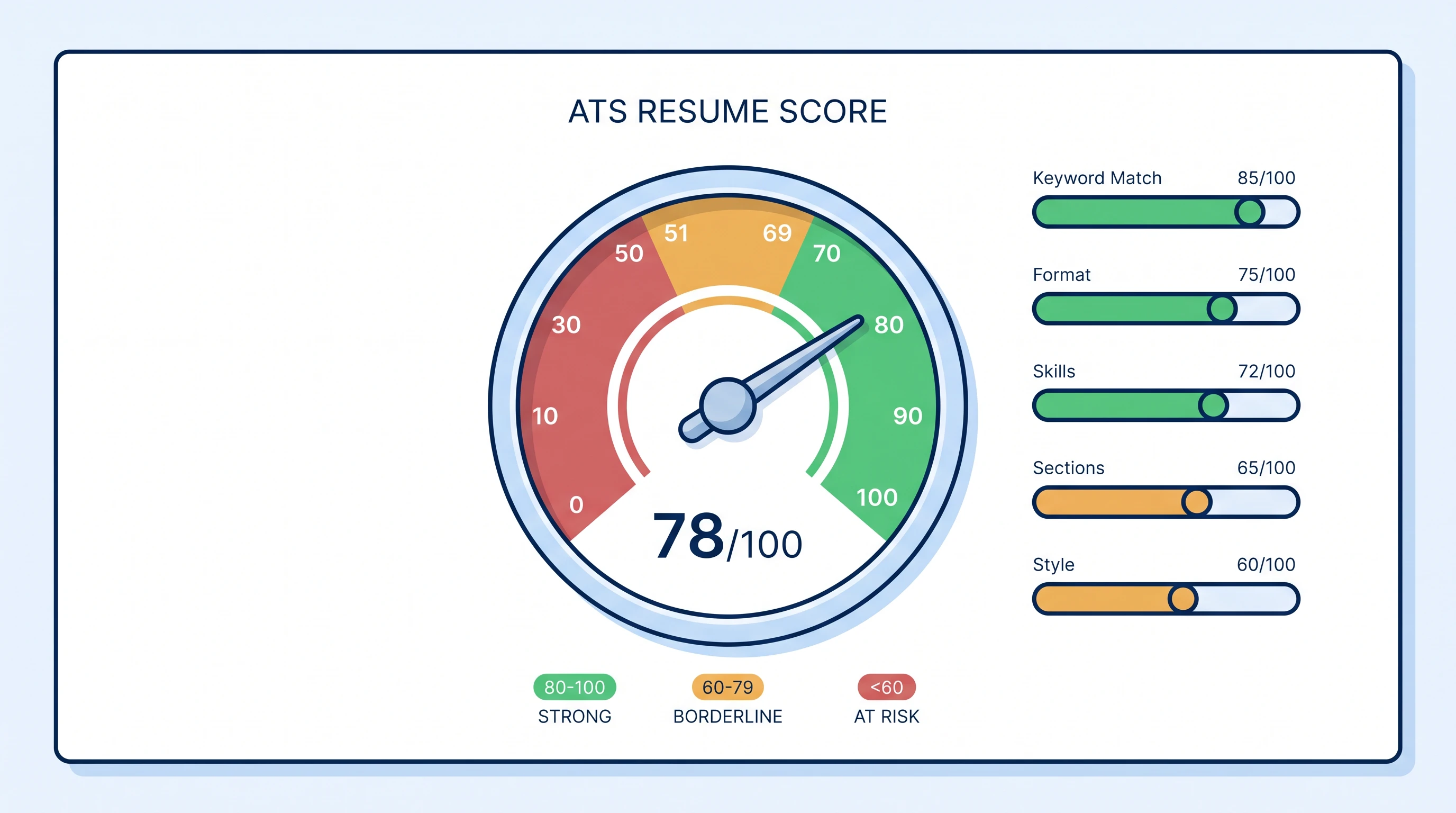
Every ATS calculates its score a little differently, but most online ATS resume scanners — the consumer-facing tools job seekers use to pre-test a resume against a specific job description — produce a 0-100 number broken into a handful of categories: keyword match, format readability, section completeness, skills coverage, and style/length.
| Score range | What it means | What to do |
|---|---|---|
| 80-100 | Strong match | Submit as-is; tailor only if you have time |
| 60-79 | Borderline | Spend 15 minutes adding missing keywords + cleaning format |
| Below 60 | High rejection risk | Either the resume is wrong for the role, or it has structural issues the parser can't get past |
The exact thresholds depend on the role and the competition, but here's the rule that actually matters: a 60+ resume tailored to the specific job will beat a generic 90+ resume every time. Tailoring matters more than raw score, because the score itself is calculated against one job description. A resume that scores 92 against a job you're not really qualified for is still going to lose to a resume that scores 68 against a job that's a great fit. For the full breakdown of the 5 score categories and the math behind the boost, see our ATS score guide.
Tailor before you scan. A 60+ resume tuned to one specific job description beats a generic 90+ resume every time — the score is always relative to one job, not an absolute measure of your resume's quality.
Scan your resume against any job — free
Drop your resume and the job description. Get your ATS match score, missing keywords, and rewrite suggestions in under 60 seconds. No card required.
Start Free ScanHow to Make Your Resume ATS-Friendly: Quick Wins
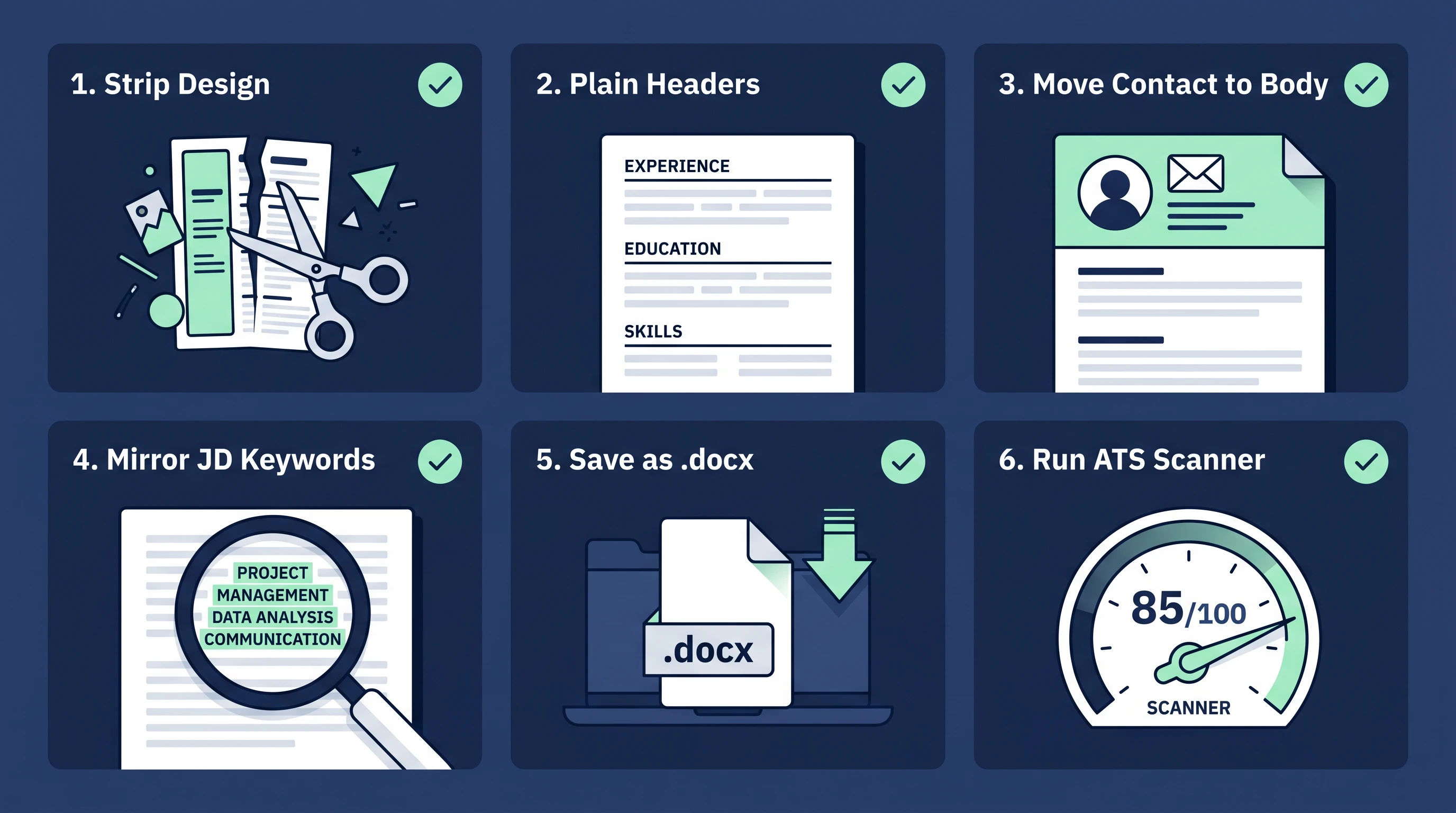
Making your resume ATS-friendly takes about 15 minutes — no full rewrite needed. Strip the design, use plain section headers, mirror the job description's keywords, and save as .docx. Six concrete steps (full walkthrough with examples in our step-by-step ATS-friendly resume guide, and the complete font / spacing / file-type spec in the format guide):
- Strip the design. Open your resume, save a copy, and remove all images, icons, columns, tables, and text boxes. Single-column only. If that breaks the layout — good. Plain is the goal.
- Re-key the section headers to plain text:
EXPERIENCE,EDUCATION,SKILLS,CERTIFICATIONS. The parser uses those exact strings to slice the document into the right fields. Cute variations likeMy JourneyorWhat I Bringwill get ignored. - Move your name and contact info into the body of the document, not a header. The very first line should be your name in 14pt; the second line should be email + phone + city.
- Mirror the job description's exact wording. If the posting says "stakeholder management", don't write "managed stakeholders" — write "stakeholder management" verbatim, once, in a bullet where it fits naturally. Do this for the top 5-8 keywords in the posting.
- Save as
.docxand submit.docxwhenever the form allows. Use a text-based.pdfonly when the form requires PDF (which it often does for senior roles). - Run it through an ATS resume scanner before you submit. Paste the resume + the actual job description, and the scanner will surface format issues, missing keywords, and your overall match score — usually in under a minute. You can scan your resume for free here and see exactly what an ATS sees.
ATS vs CV: Does It Matter Whether You Call It a Resume or a CV?
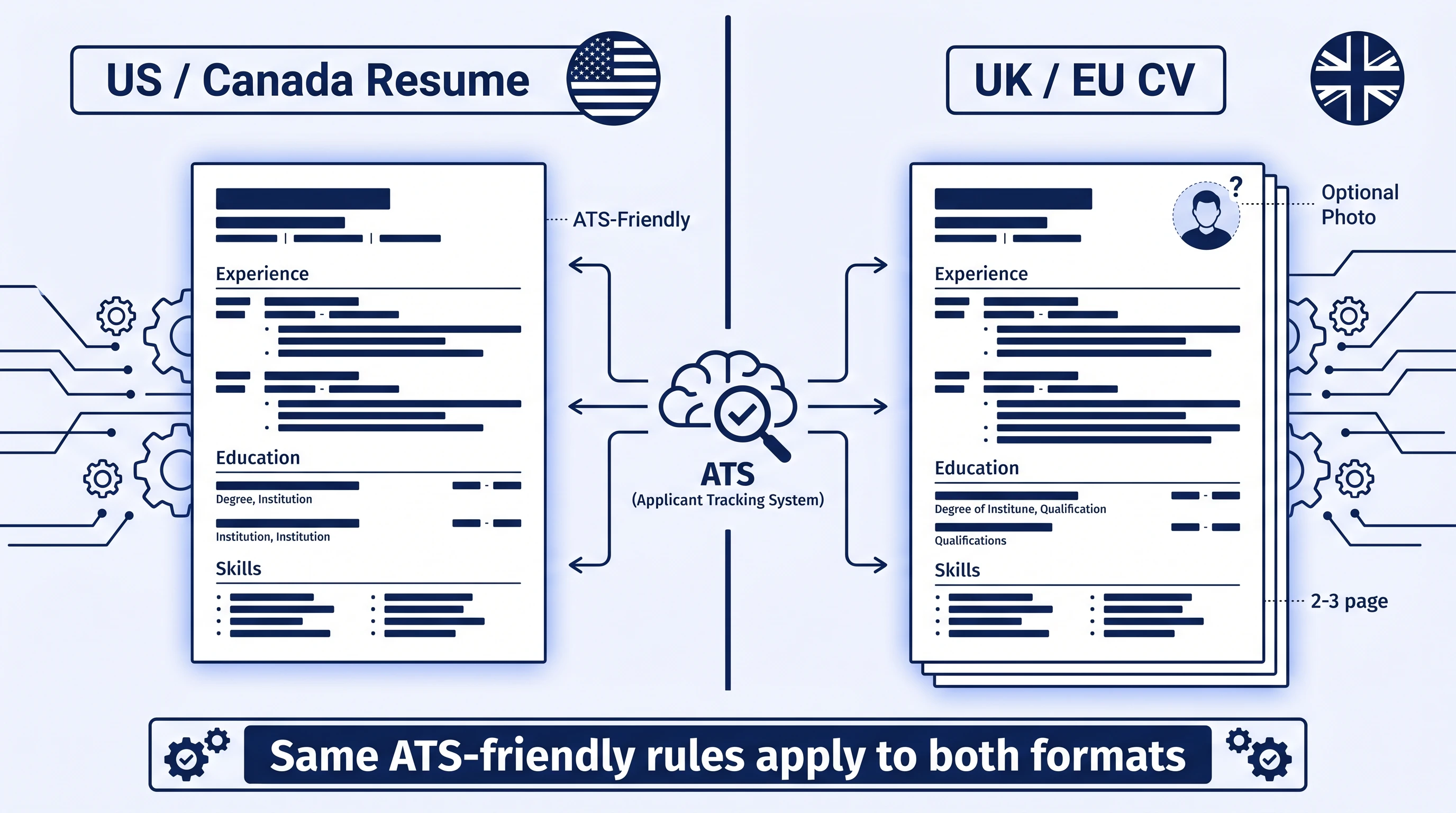
In U.S. hiring, the document you submit is a resume. In the U.K., Australia, India, and most of Europe, it's a CV (curriculum vitae). The good news: from the ATS's point of view, it doesn't matter what you call it — the parser handles the document the same way, and the same format rules apply whether you upload resume.docx or cv.docx. Searches for "ATS CV checker" and "ATS resume checker" return the same kinds of tools, and the underlying scoring logic is identical.
What does differ by region is the convention around length, photo, and personal details:
- U.S. / Canada resume — 1-2 pages, no photo, no marital status, no date of birth.
- U.K. / European CV — 2-3 pages, sometimes a photo, sometimes personal details (depending on country and seniority).
- India / Middle East CV — often 2-3 pages, more flexible on photo and personal details.
Even on a longer CV, the ATS-friendliness rules above still apply: single column, plain section headers, no text inside images, standard font, .docx or text-based .pdf.
The Bottom Line
An ATS is not your enemy — it's a piece of infrastructure that exists because real people on the hiring side can't read 500 resumes a week. But it does mean your resume has two readers, and the first one is a parser that hates anything fancy. Build the resume for that parser first — single column, plain headers, mirror the keywords from the job description — and you'll find your reply rate goes up sharply, even before you change a single sentence of your actual experience.
If you want to see exactly how your current resume stacks up against a specific job, run it through a free ATS check before you click Apply. It takes under a minute, and it's the difference between applying blind and applying with the score in your hand. For deeper dives, browse our other ATS guides — start with the 10 mistakes that auto-reject most resumes if you want the highest-impact fixes first.
Frequently Asked Questions
What does ATS stand for?
ATS stands for Applicant Tracking System. It's the resume-filtering software companies use to manage incoming job applications, parse resumes into structured data, and rank candidates against the job description before a recruiter reviews any of them.
Do all companies use an ATS?
Not literally all, but close for large employers. Jobscan's 2025 ATS usage report found that 98.4% of Fortune 500 companies used a detectable ATS in 2024. Small businesses (under ~25 employees) are the main exception — they're more likely to receive resumes directly by email.
Can an ATS read a PDF resume?
Yes — if the PDF is text-based (exported from Word or Google Docs, with searchable text). PDFs created by scanning a printed resume or screenshotting a design are read as images, and almost no ATS can extract text from them. When in doubt, submit .docx instead.
How do I know if my resume passes the ATS?
The fastest way is to run it through an online ATS resume scanner using the actual job description you're applying to. A good scanner will tell you your match score, list the missing keywords, and flag any parsing issues in your format. You can scan your resume for free here, no signup required for the first scan.
What is a good ATS score for a resume?
80 or above is a strong match; 60-79 is borderline and worth a revision; under 60 means the resume isn't competitive for that specific role. But the score is always relative to one job description — a 70 on a job you're a perfect fit for usually beats an 85 on a job you're stretching for.
Can I beat the ATS by adding white keywords in white text?
Don't. "White-text keyword stuffing" worked briefly in the 2010s; modern ATS parsers and downstream AI-based screeners flag it as suspicious, and recruiters who notice it auto-reject. Mirror the job description's wording in visible bullet points instead — that's both higher-scoring and harmless if a human reads it.